No items found.
blog
How to build a downtime reason tree that actually improves performance
By: Guidewheel
Updated:
May 2, 2026
8 min read

Every plant manager has lived this moment: a line goes down, the operator logs "Equipment Issue," and two weeks later, the same problem takes out the same machine on a different shift. Nobody connects the dots because nobody captured what actually happened.
That gap between "the machine stopped" and "here's exactly why" is where most OEE improvement programs stall. The score sits in a spreadsheet, the losses stay anonymous, and the weekly production meeting turns into a debate about whose numbers are right. The fix isn't more data. It's better structure, specifically a downtime reason tree that gives every stop event a clear, consistent label your team can act on.
This guide walks through how to build one that sticks, from first audit to full deployment.
Key terms to know before you start
If you're already fluent in OEE and TPM, skip ahead. For everyone else, here's a quick primer on the concepts that underpin a useful reason tree.
OEE (Overall Equipment Effectiveness) is the standard manufacturing KPI that multiplies three factors:
OEE component |
What it measures |
Formula |
|---|---|---|
Availability |
Uptime vs. planned production time |
Run Time ÷ Planned Production Time |
Performance |
Actual speed vs. ideal speed |
(Ideal Cycle Time × Parts Produced) ÷ Run Time |
Quality |
Good parts vs. total parts |
Good Parts ÷ Total Parts |
OEE = Availability × Performance × Quality. Industry benchmarks suggest average OEE in manufacturing lands between 60–70%, with best-in-class operations reaching 85%+ (Source: ISO 22400 manufacturing KPI standards).
The Six Big Losses from the TPM (Total Productive Maintenance) framework organize what steals that remaining 15–40%. They fall across the three OEE components: equipment failures and setup time hit Availability, minor stops and slow cycles hit Performance, and scrap or rework hit Quality.
A downtime reason tree is simply a hierarchical coding system that maps every production stoppage to one of these loss categories, then drills deeper into the specific cause.
Why most reason trees fail before they help
Here's the uncomfortable truth: many plants already have reason codes. They just don't work.
The most common failure modes look like this:
Too many codes at once. A corporate team builds 50+ codes in a conference room. Operators freeze up, default to "Other," and the data tells you nothing.
No operator input in the design. If codes don't match how operators describe problems in their own language, adoption collapses within weeks
Data collected but never acted on. Operators log dutifully for months, see zero changes on the floor, and stop caring about accuracy
Inconsistent training across shifts. First shift codes a bearing issue as "Mechanical,"; third shift codes the same event as "Maintenance." Cross-shift comparison becomes meaningless
The result? Industry experience consistently shows that a significant share of manufacturers still lack reliable downtime tracking, relying instead on shift reports or weekly rollups that arrive days after the event. Plants without standardized reason codes consistently see higher recurrence rates for the same failure mode.
So the question isn't whether you need a reason tree. It's how to build one that operators actually use and that drives measurable improvement.
Start with an audit, not a brainstorm
Resist the urge to design your reason tree in a meeting room. Start on the floor.
Weeks 1–2: Collect what you already have. Pull together existing downtime logs, maintenance tickets, operator notes, and shift handover reports. Categorize them manually into rough groupings.
A typical finding? 30–50% of recorded downtime has vague or missing reason codes. That's your baseline, and it's also your opportunity.
Weeks 2–3: Run a cross-functional workshop. Bring together your maintenance lead, two or three operators from different shifts, your continuous improvement lead, and whoever owns the data. Review the audit findings alongside the Six Big Losses framework. Brainstorm codes based on what actually stops your lines, not what a textbook says should stop them.
The output should be a draft reason tree with three levels:
Level |
Purpose |
Example |
|---|---|---|
Level 1 |
Broad category |
Equipment (Unplanned) |
Level 2 |
Specific loss type |
Jam / Blockage |
Level 3 (optional) |
Root cause detail |
Product Jam vs. Label Jam |
Keep Level 1–2 to 10 or fewer codes total. Most operators can't reliably distinguish more than that under production pressure. Use plant-floor language, not corporate jargon: "Bearing Noise" beats "Lubrication Maintenance" every time.
Design your tree around what actually breaks
Your reason tree should reflect your process, not a generic template. Here's how the structure shifts by environment:
Manufacturing type |
Dominant loss drivers |
Key code focus areas |
|---|---|---|
Discrete (CNC, stamping, assembly) |
Equipment failures, setup, jams |
Tool changes, operator errors, mechanical faults |
Process (filling, molding, converting) |
Speed drift, temperature issues, off-spec product |
Slow cycles, material quality holds, sensor faults |
Hybrid (packaging, complex assembly) |
Mix of discrete and process issues |
Jams, changeover, servo/pneumatic faults, material shortages |
The key principle: prioritize codes for your known chronic losses first. If jams cause 40% of your downtime, create sub-codes for jam types (product jam, label jam, film break). If changeovers eat your afternoons, break setup into sub-categories (format change, tooling swap, cleaning).
This is also the best way to standardize downtime categories across plants. Start with a shared Level 1 structure (Equipment, Operator/Setup, Material, Maintenance, External), then let each facility customize Level 2 and Level 3 codes to match their specific equipment and process. That shared top level gives you a common language across plants while respecting that each facility has unique operational requirements.
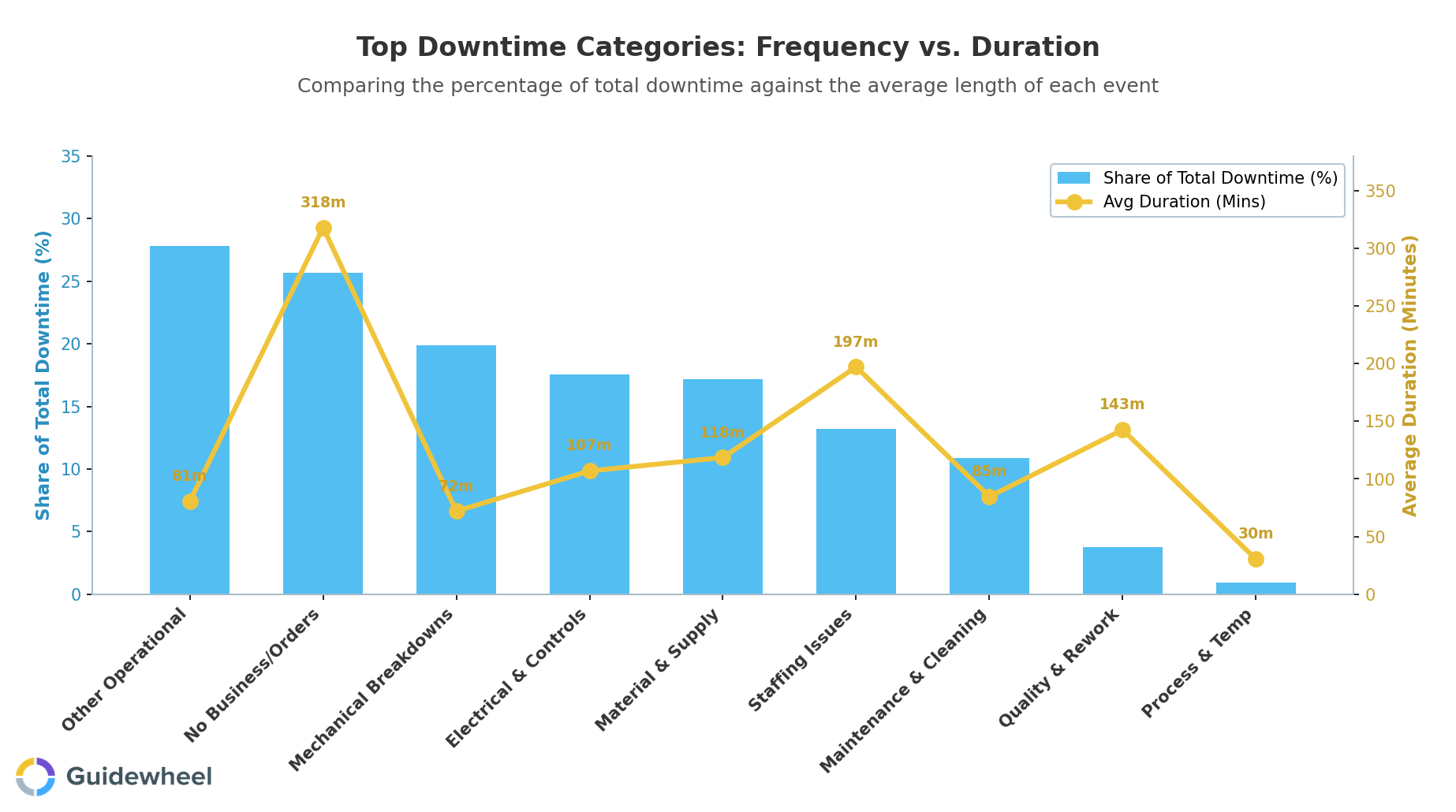
Recent performance data across 3,000+ manufacturing machines (Source: Guidewheel Performance Analysis) reveals why this structure matters. "Other Operational" accounts for 28% of total downtime, the single largest bucket, which signals a massive volume of stops that lack specific classification. Meanwhile, categories like "Mechanical Breakdowns" (20% of downtime, averaging 72 minutes per event) and "Staffing Issues" (13%, averaging nearly 200 minutes per event) represent highly actionable opportunities because they're within direct control of plant management teams. If your reason tree lumps all of these into two or three vague codes, you're guessing about where to focus.
✅
When designing your reason tree, start with a shared Level 1 structure (Equipment, Operator/Setup, Material, Maintenance, External) across all plants, then let each facility customize Level 2 and Level 3 codes. Keep the total to 10 or fewer codes at Levels 1–2 combined, use operator language instead of corporate jargon, and plan to adjust 25–40% of codes based on real-world pilot feedback. Codes capturing less than 1% of events can be consolidated, while codes capturing more than 15% likely need splitting into more specific sub-categories.
Pilot, refine, then scale
Weeks 4–8: Deploy on one or two lines. Pick a line with engaged operators and a known downtime problem. Have operators log every stop using your draft tree, whether on paper, a tablet, or a simple mobile app.
Run weekly huddles during the pilot. Ask operators what's confusing, what's missing, and what codes they keep defaulting to. Make changes visibly: "Based on your feedback, we split 'Sensor' into 'Position Sensor' and 'Speed Sensor.'" This is how you build downtime reasons operators will actually use: by co-creating them.
Typical refinement: 25–40% of codes get adjusted, merged, or retired based on real-world feedback. Codes capturing less than 1% of events can often be consolidated. Codes capturing more than 15% of events may need splitting.
Week 9+: Standardize and train all shifts. Finalize definitions. Post laminated reference guides at each machine. Train every shift, including a brief explanation of why coding matters: "Better data on jams led to a maintenance fix that cut downtime 26% on Line 3 last month."
For operators to log downtime reasons without slowing production, keep the interaction to under 15 seconds. Pre-fill equipment IDs (QR codes work well), use dropdown menus, and limit required fields. When Guidewheel's FactoryOps platform detects a stop event automatically through its clip-on current sensors, operators only need to confirm or correct the suggested reason code rather than filling out a form from scratch.
Turn reason codes into targeted improvement actions
The reason tree is the foundation. The Pareto chart is where the team sees what to fix first.
After 4–6 weeks of consistent data, run a simple Pareto analysis. Here's what a real monthly downtime summary might look like on a 250-unit/day packaging line running at 75% OEE:
Reason code |
Downtime (min) |
% of total |
Availability impact |
|---|---|---|---|
Jam, Product |
875 |
35% |
-6.2% |
Servo Fault |
625 |
25% |
-4.5% |
Setup, Format Change |
500 |
20% |
-3.6% |
Bearing Noise |
250 |
10% |
-1.8% |
Scheduled PM |
150 |
6% |
(planned) |
Other |
100 |
4% |
-0.7% |
The top three unplanned codes represent 80% of downtime. Targeting just those three will produce the fastest return. This is how you assign downtime reasons consistently and translate them into action: the codes feed directly into your maintenance planning and improvement priorities.
For the #1 loss (product jams at 875 min/month), root cause investigation might reveal sensor drift on a product detection unit, a training gap on afternoon shift, and a design friction point at the jam location. Addressing all three through sensor calibration ($2K), structured operator training ($500), and a quick-clear jam access modification ($5K) could recover +6.5 OEE points, lifting that line from 75% to over 81%.
Payback on that $7.5K investment? Under two weeks when you factor in the throughput recovery.
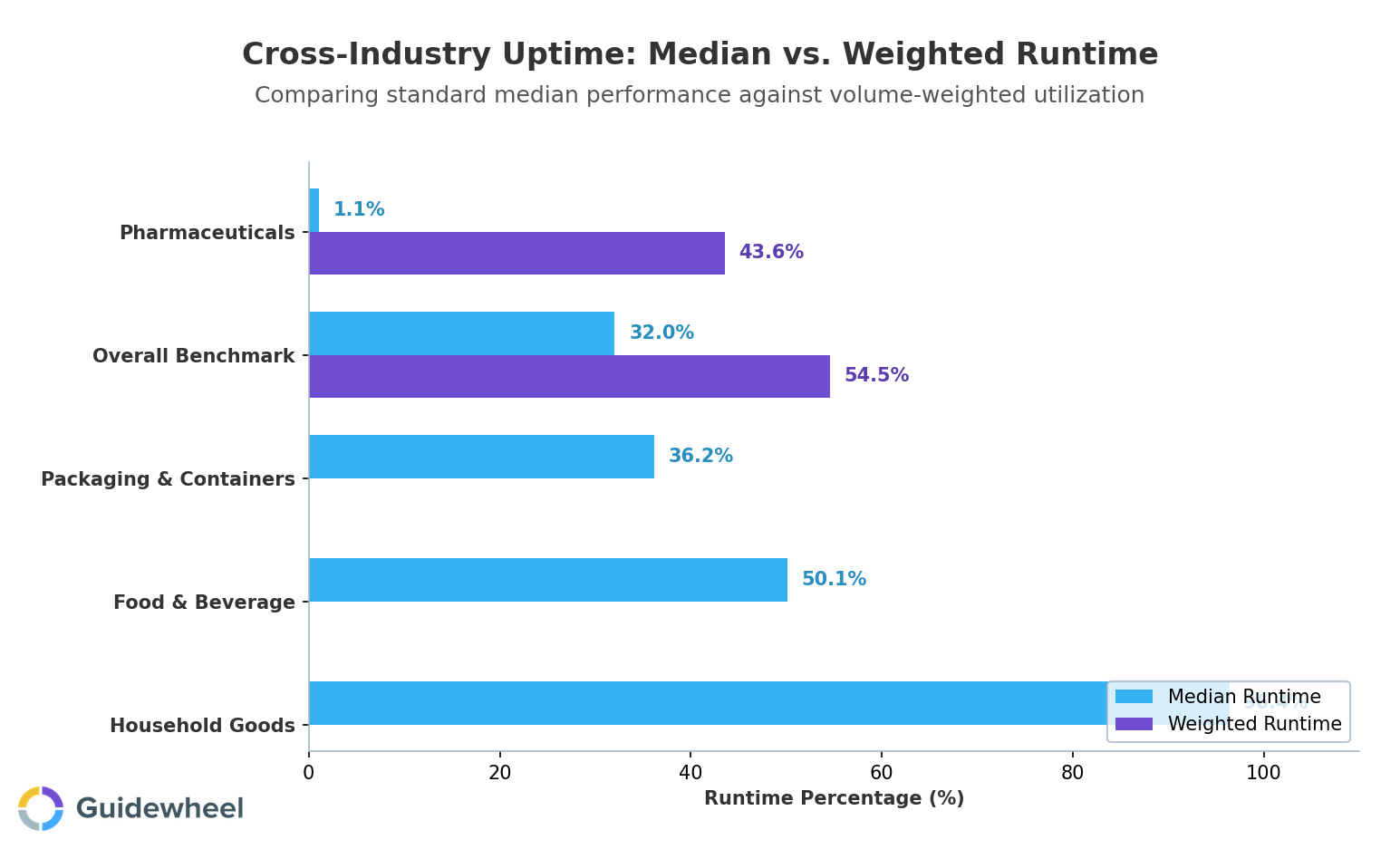
When benchmarking your results, remember that context matters enormously. A 75% OEE on a 20-year-old stamping press running mixed products is a very different achievement than 75% on a dedicated, modern injection molding line. These benchmarks serve as reference points, not universal targets. Performance targets should be adapted to your specific equipment age, product mix, and operational context.
Build a cadence that sustains improvement
A reason tree without a review rhythm decays fast. Here's a practical cadence:
Frequency |
Who |
Focus |
|---|---|---|
Weekly |
Operators + Supervisor |
Review top codes from the week, flag anomalies, celebrate accuracy |
Monthly |
Plant Manager + CI Lead |
Pareto by code/shift/line, assign root cause dives for top 3–5 |
Quarterly |
Plant Leadership |
Trend OEE by reason code, assess initiative effectiveness, benchmark |
Annually |
All Shifts |
Refresh tree, retrain, retire stale codes, add new ones |
The monthly review is where most improvement happens. It's where you compare shifts running the same equipment and discover that second shift's changeover times run 40% longer, not because the equipment is different, but because the procedure isn't standardized.
Plants with standardized reason codes typically report significantly faster mean time to repair because maintenance teams can prioritize by failure mode and pre-stage parts and expertise. Trending failure modes like recurring bearing issues justify predictive maintenance investment or equipment upgrades. That's the cycle: visibility feeds prioritization, prioritization drives action, and action shows up in your OEE score.
Start building your reason tree this week
You don't need perfect OEE software or a six-figure automation project to get started. A cross-functional workshop, a draft reason tree, and a pilot line can deliver 5–10 OEE points of improvement within 6–8 weeks through better data, faster decisions, and targeted fixes.
The progression is simple: reason tree discipline first, then automated downtime tracking software to scale it across lines and plants. Guidewheel's FactoryOps platform works on all equipment, from decades-old legacy machines to brand-new lines, using simple clip-on current sensors that require no PLC integration and can deploy in days without disrupting production.
The goal isn't a perfect tree on day one. It's a tree that's good enough to reveal your top three losses, actionable enough to drive targeted fixes, and simple enough that every operator on every shift uses it consistently.
With Guidewheel, we now get key metrics like production, downtime, downtime codes, scrap, and cycle time automatically and accurately. Our team no longer takes time to track manually and has been able to instead invest that time in improvements. Everybody knows when we're winning or losing. Each teammate understands how their work drives the success of the organization, and that every decision they make has a direct impact on the business.
Edgar Yerena, COO, Custom Engineered Wheels.
Ready to find out how much capacity is hiding in your downtime data? Book a Demo and start with your toughest line.
💡
Frequently asked questions
What is a downtime reason tree?
A downtime reason tree is a hierarchical coding system that classifies every production stoppage by category, specific cause, and root cause detail. It typically has two to three levels: a broad category like "Equipment (Unplanned)" at the top, a specific loss type like "Servo Fault" in the middle, and an optional root cause detail at the bottom. The purpose is to convert vague downtime records into structured, diagnostic data that reveals patterns and drives targeted improvement.
How many reason codes should I start with?
Start with 10–15 codes across Level 1 and Level 2 combined. Research consistently shows that operators can't reliably distinguish more than about 10 categories under production pressure. You can always expand later once your team builds the discipline and your data reveals gaps. Codes that capture less than 1% of events can be consolidated, while codes capturing more than 15% likely need splitting.
Can I build a reason tree without investing in software first?
Absolutely. A reason tree is a discipline, not a software feature. You can start with paper logs, spreadsheets, or a simple mobile form. The key is consistent coding and a regular review cadence. Many plants achieve meaningful OEE gains of 5–10 percentage points through manual logging and weekly Pareto reviews before investing in automated downtime tracking software.
How do I get operators to use reason codes consistently?
Involve operators in the design process from the start. Use their language for code descriptions, keep the selection process to under 15 seconds, and post visual reference guides at each machine. Most importantly, close the feedback loop: show operators monthly what their data revealed and what actions resulted. When the team sees that logging "Product Jam" led to a sensor fix that cut stoppages in half, coding discipline improves naturally.
How long before I see measurable OEE improvement from a reason tree?
Most plants see actionable patterns within 4–6 weeks of consistent logging. The first Pareto analysis typically reveals that three to five reason codes account for 70–80% of downtime. Addressing the top two or three causes can deliver 5–10 OEE points of improvement within the first 6–8 weeks. Sustained improvement of 10–15+ points is common within 6–12 months as the review cadence matures and root cause investigations deepen.
About the author
Lauren Dunford is the CEO and Co-Founder of Guidewheel, a FactoryOps platform that empowers factories to reach a sustainable peak of performance. A graduate of Stanford, she is a JOURNEY Fellow and World Economic Forum Tech Pioneer. Watch her TED Talk—the future isn't just coded, it's built.