No items found.
blog
How to track downtime reasons operators will actually use - without adding paperwork
By: Guidewheel
Updated:
March 18, 2026
9 min read

Every plant has downtime codes. And every plant has operators who ignore half of them.
It's the same story across packaging lines, plastics shops, metals processing, and food production: someone designs a list of 40 or 50 reason codes, prints it on a laminate card, tapes it to the machine, and expects the crew to fill it in mid-shift. Two weeks later, 80% of entries say "other" or "mechanical issue," and nobody trusts the data enough to act on it.
The tracking effort quietly dies, and the team goes back to tribal knowledge and shift-change conversations to piece together what happened.
Here's the good news: The data you need to reduce downtime in manufacturing, justify maintenance investments, and benchmark performance across shifts already exists.
The gap is not technology or willpower. It's the process you put around data capture. This guide walks through how to build a downtime tracking system operators will actually use, without turning their shift into a data-entry exercise.
Why most downtime reason lists fail on the floor
The root cause is almost always the same: the taxonomy was designed by engineers or CI managers in a conference room, not by the people who have to use it at 2 a.m. while a line is down.
Here's where these lists break down on the floor:
Too many codes. A list of 50 reason codes looks thorough on paper, but an operator standing next to a stopped machine does not have time to scroll through five screens or flip a laminate card. They pick the first thing that seems close and move on.
Codes don't match operator language. If maintenance calls it "hydraulic pressure loss" but the operator calls it "the press won't clamp," the code feels foreign. Foreign codes get skipped.
No feedback loop. Operators enter data, and nothing visible happens. No fix, no acknowledgment, no trend shared at the next shift meeting. The message is clear: this data doesn't matter.
Manual entry adds friction. Paper logs filled out at end-of-shift rely on memory. Research suggests manual data entry carries a 1% to 8% error rate, and that's before accounting for forgotten events (Source: ShiftFlow). Micro-stops under five minutes, which can add up to hours per week, rarely make it onto a paper log at all.
The fix is not "better discipline." It's a better system.
Design your taxonomy with operators, not for them
A well-designed downtime reason code structure balances specificity with simplicity. The goal: enough detail to guide action, few enough options that the right code is obvious in under two taps.
Keep it to three levels max
Level |
Purpose |
Example |
|---|---|---|
1 |
Broad category |
Mechanical, Electrical, Material, Staffing, Changeover |
2 |
Functional subcategory |
Motor failure, Sensor fault, Raw material shortage |
3 |
Specific root cause (filled post-event) |
Bearing wear, Misalignment, Supplier delay |
Operators should only need to select Level 1 and Level 2 at the moment the machine stops. Level 3, the true root cause, gets added later during post-incident review by maintenance or the CI team.
This keeps the operator's burden light while still producing data that's specific enough for Pareto analysis and root cause investigation.
Build the list from the floor up
The best approach is to involve frontline operators and maintenance technicians in taxonomy design. Run a two-week pilot where operators write downtime reasons in their own words on a simple form. Then cluster those descriptions into categories collaboratively.
When the people using the codes helped create them, adoption improves dramatically, and the language on the screen matches the language on the floor.
Post the final list visibly near each machine, on a printed card or a digital display, and teach it during onboarding. If someone new can learn the codes in five minutes, you've got the right level of simplicity.
Make correct entry the path of least resistance
Here's the key point: operators don't resist tracking downtime, they resist paperwork. Remove the paperwork, and adoption follows.
Context-aware prompts beat memory-based entry
If a machine throws an alarm code for a motor overload, the interface should surface that alarm and suggest the two or three most likely reason codes, not force the operator to navigate a full menu. One-tap or two-tap entry of the most common reasons is the design target.
Some automated downtime tracking systems detect when a machine stops based on power draw or production counts and prompt the operator to confirm or classify the reason, rather than asking them to initiate the entry from scratch.
This "automation plus confirmation" model cuts friction significantly compared to starting from a blank form.
Guidewheel's FactoryOps platform takes this approach by using clip-on sensors that read a machine's electrical current, essentially its heartbeat, to detect run, idle, and down states automatically across any equipment, from legacy lines to brand-new cells.
Because the system works on cellular connectivity (no IT infrastructure required), it can deploy on a single line in days and prompt operators for reason codes through simple touchscreen interfaces. The machine does the heavy lifting; the operator just confirms.
✅
The most effective downtime tracking systems combine automated machine state detection with simple operator confirmation. Rather than asking operators to initiate entries from scratch, sensors detect when a machine stops and prompt a one-tap or two-tap reason code selection from a short, contextual list. This "automation plus confirmation" approach dramatically reduces friction while producing data specific enough for Pareto analysis and root cause investigation.
Close the loop visibly
When operators see that their downtime data led to a specific fix, they understand the data has value. Share weekly Pareto charts at shift meetings.
Call out the wins: "The bearing replacement you flagged on Line 3 cut that category of downtime by 40% this month." If the data disappears into a report nobody reads, operators will stop entering it. Transparency is the best adoption tool you have.
The downtime categories that actually matter
Once you have clean data flowing, the next question is: which categories should you focus improvement efforts on?
Analysis of over 14,700 downtime events across multiple manufacturing sectors reveals that the controllable categories, the ones your team can actually act on, collectively represent the majority of lost production time (Source: Guidewheel Performance Analysis).
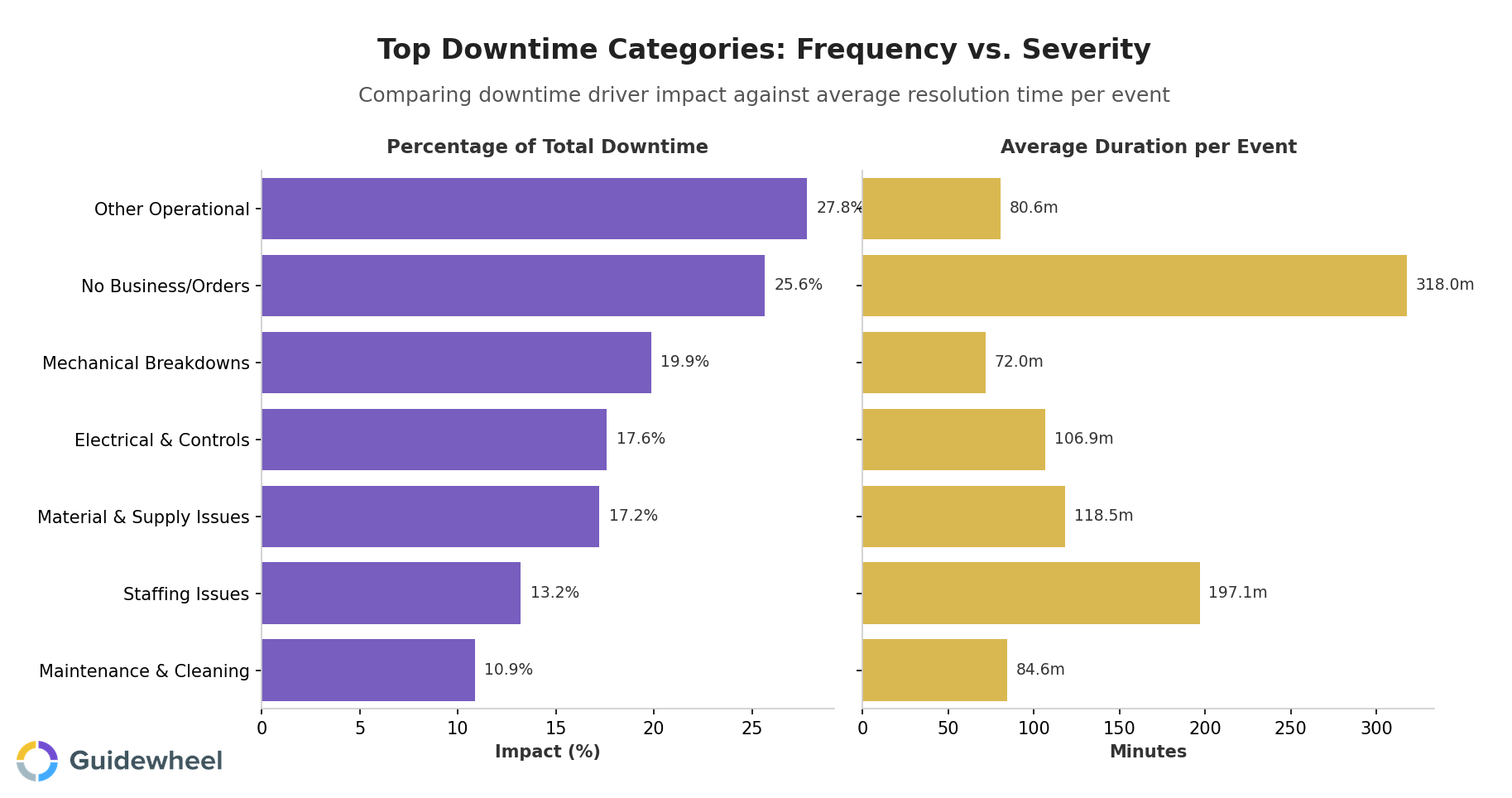
What stands out: mechanical breakdowns are frequent but average only 72 minutes per event. Staffing issues and material shortages happen less often but consume 197 and 119 minutes per event respectively. This distinction matters because it changes what you do next.
Downtime category |
% of total downtime |
Avg. minutes per event |
Best intervention |
|---|---|---|---|
Other Operational |
28% |
81 |
Refine codes to break this into specific subcategories |
Mechanical Breakdowns |
20% |
72 |
Preventive maintenance schedule optimization |
Electrical & Controls |
18% |
107 |
Condition monitoring, predictive alerts |
Material & Supply |
17% |
119 |
Buffer stock adjustments, supplier coordination |
Staffing Issues |
13% |
197 |
Staggered scheduling, cross-training |
Maintenance & Cleaning |
11% |
85 |
Standardized procedures, SMED principles |
The "Other Operational" category at 28% is a red flag in any facility. It usually means the taxonomy needs refinement, because operators are selecting "other" when no code fits.
If your "other" bucket is above 10%, revisit your codes with the crew and split it into specific, actionable subcategories.
How your uptime compares across industries
Benchmarking your machine utilization against industry peers gives you a reference point for whether your downtime levels represent an improvement opportunity or reflect the realities of your process. While optimal performance varies significantly by facility, product mix, and equipment age, the spread across sectors is worth understanding.

These benchmarks, drawn from 2,800+ machines across 13 sectors (Source: Guidewheel Performance Analysis), serve as reference points rather than universal targets.
A chemicals facility running complex batch processes will naturally operate differently than a household goods line running continuous production. The value is in knowing where you sit relative to peers and, more importantly, in comparing your own lines against each other to find the gap between your best and your average.
A 30-day playbook to get downtime tracking right
You don't need a massive MES overhaul to start. Here's a practical sequence that proves value fast:
Week 1: Build and validate the taxonomy
Pull together two or three operators, a maintenance tech, and a supervisor
Review the last month's production issues from memory and informal logs
Draft a two-level reason code list with no more than 15 to 20 codes total
Test it against five recent downtime events to check for gaps
Week 2: Pilot on one line
Deploy the codes on a single production line or shift
Use a simple tablet, touchscreen, or even a structured paper form
Set the threshold: log any stop longer than two to five minutes
Assign a shift lead to review entries daily for consistency
Weeks 3-4: Analyze, communicate, and act
Build a Pareto chart ranking downtime reasons by total minutes lost
Identify the top three categories driving roughly 80% of downtime
Pick one quick win per category: sensor replacement, spare parts pre-positioning, schedule adjustment, or operator refresher training
Share results with the full team at shift meetings
Research from Wintriss suggests that even minimal effort, simply making machine status visible to the shift, typically yields a 5% reduction in downtime. Moderate effort with active reason code follow-up drives 10% reductions.
For a facility with 40% baseline downtime, a 10% relative reduction equals roughly six to eight additional productive hours per week per machine, often enough to pay for monitoring software within months.
When to graduate from Excel to software
Signal |
What it means |
|---|---|
Running 8+ machines across multiple shifts |
Manual logs can't keep up with volume |
"Other" category exceeds 15% of entries |
Operators need contextual prompts, not memory |
Micro-stops are invisible in your data |
You need automated stop detection |
You're benchmarking across lines or sites |
You need standardized, centralized data |
Maintenance can't calculate MTBF or MTTR |
You need timestamped, machine-level records |
If two or more of these apply, spreadsheets are costing you more in missed insight than software would cost to deploy.
Turn downtime data into your fastest path to more capacity
Tracking machine downtime reasons that operators will actually use is not about adding paperwork. It's about removing it.
Automate the detection. Simplify the classification. Close the loop with visible action. When the people closest to the work see that their input drives real fixes, the data gets better, the fixes come faster, and the whole operation moves from reactive to proactive.
The gap between your best-performing line and your average line is your hidden factory. Downtime data is how you find it.
Want to see where downtime is really coming from? Book a demo to explore how Guidewheel's FactoryOps platform can give your team automated downtime tracking, operator-friendly reason code capture, and cross-plant benchmarking, all deployed in days with simple clip-on sensors that work on any machine.
With Guidewheel, we now get key metrics like production, downtime, downtime codes, scrap, and cycle time automatically and accurately. Our team no longer takes time to track manually and has been able to instead invest that time in improvements. Everybody knows when we're winning or losing. Each teammate understands how their work drives the success of the organization, and that every decision they make has a direct impact on the business.
Edgar Yerena, Custom Engineered Wheels.
💡
Frequently asked questions
How do I track downtime reasons without adding operator paperwork?
The most effective approach is to automate machine state detection using sensors that read power draw or production signals, then prompt operators to confirm or classify the stop reason with a one-tap or two-tap selection on a touchscreen.
The system captures the "when" and "how long" automatically. The operator only adds the "why," and only from a short, contextual list. This replaces end-of-shift paper logs with a five-second interaction at the moment the stop happens, when memory is freshest.
What is the formula for machine downtime rate?
Downtime rate equals total downtime hours divided by total available hours (downtime plus operating hours), multiplied by 100. For example, if a machine is down 40 hours in a month and operates 360 hours, the downtime rate is 10%.
Track this metric at the machine level to compare assets fairly, since a machine with fewer downtime hours but less scheduled time can actually have a worse rate.
How should downtime reason codes be structured for useful analysis?
Use a two-level hierarchy for operator entry: a broad category (mechanical, electrical, material, staffing, changeover) and a functional subcategory (motor failure, sensor fault, raw material shortage). Keep the total list under 20 codes.
Add a third level for root cause only during post-incident review. If your "other" category exceeds 10% of total entries, the taxonomy needs refinement with input from the operators who are selecting it.
When is Excel no longer enough for downtime tracking?
Excel becomes a bottleneck when you're running more than eight machines across multiple shifts, when micro-stops are invisible in your data, when you need to benchmark across lines or sites, or when maintenance teams can't calculate reliability metrics like MTBF and MTTR from the available records.
At that point, the cost of missed insight exceeds the cost of purpose-built downtime tracking software.
How can manufacturers reduce unplanned downtime quickly?
Start with a Pareto analysis of your downtime data to identify the top three categories driving 80% of losses. Then target quick wins: sensor recalibration, spare parts pre-positioning for high-MTTR failures, preventive maintenance schedule adjustments based on actual MTBF, and operator refresher training for setup-related stops.
Facilities that execute three or four of these interventions simultaneously often see 5 to 15% downtime reductions within 30 days, with no capital expenditure required.
About the author
Lauren Dunford is the CEO and Co-Founder of Guidewheel, a FactoryOps platform that empowers factories to reach a sustainable peak of performance. A graduate of Stanford, she is a JOURNEY Fellow and World Economic Forum Tech Pioneer. Watch her TED Talk—the future isn't just coded, it's built.